Awards Icon Set: Practical Uses for Designers, Marketers, and Business Owners
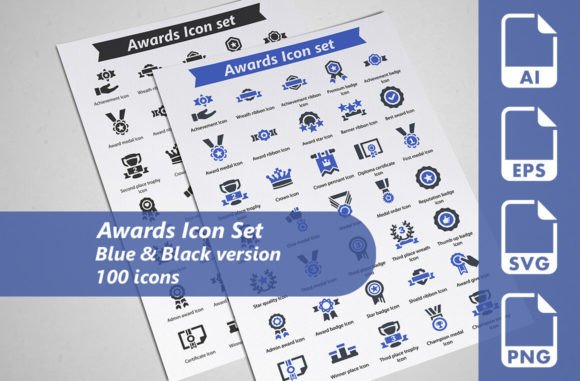
If you have ever needed to communicate achievement, recognition, or excellence in a design project, you have probably faced a familiar challenge: finding icons that look professional without taking hours to customise. The Awards Icon Set was built specifically to solve that. It includes 100 carefully crafted icons, available in blue and black versions, with fully editable vector files, SVG, EPS, and transparent PNG formats. But beyond the technical specs, what really matters is how this set fits into real work—whether you are building a website, preparing a presentation, designing infographics, or creating marketing materials.
Why a dedicated awards icon set matters for real projects
Icons are not decorative afterthoughts. They guide the eye, clarify meaning, and help people process information quickly. When you need to represent concepts like winner, trophy, medal, certificate, or star rating, generic icons often look out of place or fail to convey the right level of professionalism. A well-designed awards icon set gives you visual consistency across your materials. Instead of searching through dozens of unrelated icons and hoping something fits, you have a focused library that speaks the language of recognition and success.
For freelancers and small business owners, time is money. Having 100 icons ready in multiple formats means you can drop them directly into client projects without spending extra hours editing or adjusting. The included SVG files work seamlessly in web design, while EPS and transparent PNG files cover print and presentation needs. The two colour versions—blue and black—give you flexibility without forcing you to manually recolor every icon from scratch.
Website and app design
If you are building a website for an awards ceremony, a corporate recognition programme, or a platform that showcases achievements, icons become essential navigational and visual elements. A trophy icon next to a "Hall of Fame" section, a medal icon beside a leaderboard, or a certificate icon near a verification badge—these small touches make interfaces feel intentional. The transparent PNG format (256×256 pixels) is ready for quick placement, while the SVG files allow for responsive scaling without quality loss. For developers and designers who value performance, using vector icons also keeps page load times low.
Consider a scenario where you are designing a dashboard for an employee recognition platform. You need icons that clearly distinguish between different award types: years of service, performance milestones, peer recognition, and leadership achievements. With 100 unique icons, you can assign distinct visuals to each category, making the interface more intuitive for users. The editable AI files also allow you to tweak colours to match your brand palette, so the icons feel like a native part of the design rather than an afterthought.
Presentations and pitch decks
Presentations rely heavily on visual shorthand. If you are pitching a new awards programme to stakeholders, or presenting annual results that highlight team achievements, using generic clip art can undermine your credibility. A professional icon set helps you maintain a polished, consistent look throughout your slides. You can place a trophy icon alongside a key metric, use a ribbon icon to denote a milestone, or add a star icon to emphasise top performance.
For educators and trainers, presentation materials benefit from icons that reinforce learning. When explaining the criteria for an award or the steps to achieve recognition, icons break down complex information into digestible visuals. The EPS files (256×256 pixels in Eps10 format) work well in PowerPoint, Keynote, or Google Slides, and you can resize them without worrying about pixelation. The blue and black versions give you two ready-to-use colour schemes, so you can choose what fits your slide background without extra editing.
Infographics and data visualisations
Infographics are about telling a story with data, and icons are a core part of that narrative. If you are creating an infographic about industry awards, customer satisfaction ratings, or employee engagement scores, icons help readers instantly grasp categories and comparisons. Instead of relying on bullet points or text-heavy labels, you can use a medal icon to represent "Gold Standard" or a certificate icon to indicate "Certified Excellence."
Bloggers and content creators often use infographics to boost engagement and shareability. An infographic that explains "10 Types of Awards Your Business Can Win" becomes much more compelling when each award type has a dedicated icon. The AI vector files are fully editable, so you can adjust sizes, combine icons, or add text overlays without losing quality. Because the set includes 100 icons, you have enough variety to avoid repetition even in longer visual stories.
Printed materials and promotional items
Print design demands high-resolution assets. The EPS and transparent PNG files at 256×256 pixels give you the quality needed for flyers, brochures, posters, and banners. If you are designing a promotional flyer for an awards night, or creating a brochure that highlights client success stories, icons add a layer of visual polish that text alone cannot achieve.
Small business owners often need to produce marketing materials on tight budgets. Instead of hiring a designer to create custom illustrations for every flyer or social media graphic, having a versatile icon set allows you to assemble professional-looking materials yourself. The blue and black colour options work well for corporate branding, and the editable AI files let you adjust colours if your brand uses different hues. For a local business hosting an annual customer appreciation awards event, these icons can be used across invitations, certificates, social media posts, and even banners at the venue.
E-learning and educational content
Course creators and educators frequently use icons to structure lessons, highlight achievements, or reward progress. In an online course, a trophy icon can mark completed modules, a star icon can indicate bonus content, and a certificate icon can signal course completion. These visual cues help learners navigate content and feel a sense of accomplishment as they progress.
For corporate training programmes, icons can gamify the learning experience. When employees earn badges or recognitions for completing training sections, the icons become tangible symbols of progress. The SVG files are particularly useful here because they remain crisp on any screen size, from desktop monitors to mobile devices. Since the set includes 100 distinct icons, you can assign different visuals to different skills, courses, or achievement levels without running out of options.
Compatibility with your workflow
Before downloading any icon set, think about the software and tools you use regularly. If you work primarily in Adobe Illustrator, the fully editable AI files give you maximum control. If you prefer a lighter workflow, SVG files are widely supported in web development tools, and transparent PNGs work in virtually any application. The inclusion of EPS files (Eps10 version) ensures compatibility with older design software as well.
For teams collaborating across different tools, having multiple formats reduces friction. A web developer might use SVG files directly in code, while a graphic designer works with AI or EPS files in print layouts, and a marketing coordinator drops PNGs into social media graphics. The set accommodates all these scenarios without requiring file conversions or quality loss.
Colour and customisation needs
The Awards Icon Set comes in blue and black versions, which cover a wide range of branding contexts. Blue is often associated with trust, professionalism, and achievement—making it a natural fit for corporate and educational materials. Black icons work well for minimalist or high-contrast designs. If your brand uses specific colours outside these options, the editable AI files allow you to change colours globally or per icon. This is especially useful for designers who need to match a precise brand palette across multiple materials.
For entrepreneurs and small business owners who may not be experienced with vector editing, starting with the provided colour versions saves time. You can use the icons immediately without needing to learn how to recolour complex vector files. If you later decide to customise, the AI files are structured for easy editing, even for beginners.
Scale and resolution requirements
Different projects demand different resolutions. The SVG and EPS files are vector-based, meaning you can scale them from tiny badges to large banners without losing clarity. The transparent PNG files at 256×256 pixels are pre-exported for projects where you need a quick, high-quality raster image. For web use, 128×128 pixel SVG files provide a good balance between sharpness and file size. Consider where you plan to deploy the icons—if they will appear on high-resolution displays (like Retina screens), vectors or larger PNG exports will ensure they remain crisp.
Real outcomes from using a focused icon set
When you invest in a dedicated awards icon set, you are not just buying files—you are buying consistency, time savings, and professional polish. Freelancers can deliver faster turnaround times because they do not need to create icons from scratch for every project. Marketers can maintain brand cohesion across campaigns because the icons share a clear visual style. Educators can make learning materials more engaging without needing advanced design skills. Business owners can produce marketing collateral that looks intentional and credible, even without a full-time design team.
The 100 icons in two colour versions give you 200 total assets, which is enough variety to cover most projects without feeling repetitive. Whether you are designing a single badge for a social media post or building an entire recognition programme from scratch, having this library on hand means you are never stuck searching for the right visual representation of achievement. And because the files are fully editable, you retain the flexibility to adapt them as your needs evolve.
If you work in any field where recognition, awards, or achievement play a role—corporate communications, education, event planning, web development, marketing, or content creation—this icon set offers a practical foundation. It eliminates the guesswork of finding appropriate visuals and lets you focus on the actual message you want to communicate.