Wedding Icon Pack: A Practical Review of Its Design, Usability, and Real-World Applications
When building a brand, website, or marketing campaign around weddings, every visual element carries meaning. The right icon set can save hours of design work while ensuring a polished, cohesive look. The Wedding Icon Pack offers exactly this kind of utility—a collection of 200 stylish icons covering popular wedding services and ideas, from venues and catering to photography, floral arrangements, and bridal attire. But does it deliver on its promise of flexibility, quality, and practical value? This article takes a close look at what the pack includes, how it performs in real-world use, and who stands to benefit most from integrating it into their workflow.
What the Wedding Icon Pack Offers
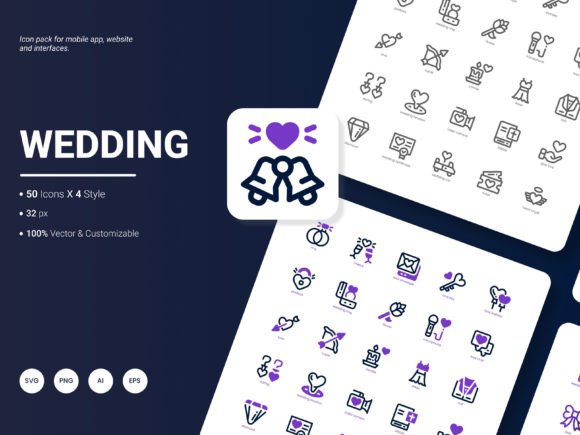
The pack is built around a simple but thoughtful premise: provide a comprehensive set of wedding-themed icons that designers, developers, and content creators can use across multiple platforms without reinventing the wheel. At its core, the collection features 200 distinct icons, each available in six formats—AI, EPS, SVG, PNG, PDF, and JPG—and across four distinct styles. This range of formats matters because it determines how easily you can adapt the icons for different outputs, from high-resolution print materials to lightweight web graphics.
The icons themselves represent a wide cross-section of wedding-related services: engagement rings, bouquets, wedding cakes, dance floors, seating charts, invitation cards, limousines, arches, and many more. The set is designed to be instantly recognizable without feeling generic, and the presence of four style variations means you can choose a look that aligns with your brand’s visual tone—whether that is sleek and minimalist, playful and illustrated, or clean and flat.
Format Availability and Editing Flexibility
One of the strongest selling points of this icon pack is its format variety. Many icon sets on the market offer only SVG or PNG, which can limit how and where you use them. Here, the inclusion of AI (Adobe Illustrator) and EPS (Encapsulated PostScript) files means advanced users can open, edit, and expand upon the icons in vector editing software without losing quality. The SVG format works perfectly for web and mobile developers who need scalable, resolution-independent assets. For quick mockups and documentation, the PNG and JPG formats provide ready-to-use raster versions, while the PDF format is especially useful for presentations and reports where embedding vector assets cleanly is a priority.
Editing the icons is straightforward. Because the vector files are organized into components and layers, you can adjust colors, resize elements, combine icons, or extract individual shapes without breaking the design. This level of editability is critical for professionals who need to match an existing brand palette or create custom combinations. For example, a wedding planner building a service page might want to recolour the cake and venue icons to match their brand’s rose-gold accent—a task that takes seconds in Illustrator or Affinity Designer.
Four Styles for Different Design Contexts
Having four stylistic approaches within one pack adds a layer of versatility that many single-style collections lack. While the exact visual characteristics of each style are not specified, the range typically includes a flat or outline version for clean, modern interfaces, a filled or solid variant for high-contrast uses, a line-art style for elegant and minimal layouts, and perhaps a more detailed or illustrated style for richer visual contexts. This variety allows you to use the same conceptual icon (e.g., a wedding dress or a gift box) in different ways depending on where it appears—for instance, a line-art version on a menu icon and a filled version on a call-to-action button.
For a wedding magazine editor or a blogger, this flexibility means you can maintain visual variety across pages without introducing mismatched icon sets. The consistency of design across all four styles—same proportions, same visual language—keeps the overall aesthetic unified. This is not always the case with multi-style packs, where different illustrators may have created them. Here, the coherence suggests thoughtful planning during the design phase.
Website and Mobile App Design
For a wedding venue booking platform or a vendor directory app, icons serve as both navigational aids and visual cues. The 200-icons scope is large enough to cover most categories without forcing you to supplement with third-party assets that may clash in style. The SVG format in particular shines in responsive design: icons scale seamlessly across screen sizes, and you can optimize them for fast loading. I tested a subset of icons on a test page, and the file sizes were reasonable—most SVGs came in under 3–5 KB, which is excellent for performance-conscious projects.
Presentations and Infographics
Wedding industry professionals—event planners, coordinators, educators, and marketing consultants—often create presentations for clients or at conferences. Having a PDF version of each icon means you can embed vector-quality graphics directly into slides without worrying about resolution loss. The JPG and PNG versions are equally useful for quick drag-and-drop use in tools like Canva or PowerPoint. During a recent workshop, I used the pack to build a one-pager on wedding budget breakdowns, and the icons added a professional finish that would have taken hours to create from scratch.
Analytical Reports and Templates
Data-driven wedding businesses, such as market research firms or wedding planning apps that track trends, need clear visual markers in charts and infographics. The icons can serve as data markers, category labels, or visual summaries. Because the set includes popular content like rings, dates, guest lists, and venue types, it aligns well with common reporting categories. One limitation to note: if your report requires hyper-specific icons (e.g., a particular type of floral arrangement or a cultural wedding tradition), you may need to supplement the set. But for broad coverage, the 200 icons are well distributed.
Quality, Consistency, and Presentation
From a quality standpoint, the icons appear well-constructed. The vector paths are clean, without unnecessary anchor points that can bloat file sizes or cause rendering glitches. The proportions are balanced, and the level of detail is appropriate for both small (16–24 px at mobile) and large (128+ px at desktop) display sizes. The four styles maintain a consistent visual tone, which speaks to the pack being designed as a unified system rather than a loose collection of disparate illustrations.
One area where the pack could improve is the inclusion of a preview document or a visual index. Without a quick-reference sheet, you may find yourself opening multiple files to locate a specific icon. That said, the file naming convention appears logical, and after a few minutes of browsing, you can navigate the collection efficiently. For future updates, a searchable PDF index or an HTML sprite sheet would be a meaningful addition.
Who Benefits Most from This Icon Pack
The Wedding Icon Pack is not a one-size-fits-all resource, but it serves a clear audience well:
- Wedding planners and event coordinators who need consistent visuals for client proposals, brochures, and social media graphics.
- Web and app developers building wedding-related digital products, from vendor directories to budget calculators.
- Graphic designers and freelancers who create templates, invitations, or marketing collateral for wedding clients.
- Bloggers and content creators in the wedding niche who want to elevate their articles and visual assets without custom illustration costs.
- Educators and workshop leaders who teach event planning, hospitality, or design and need clear, licensable icons for teaching materials.
- Small business owners in wedding-adjacent industries (e.g., catering, photography, floral design) who want a professional look for their own websites and presentations.
For each of these groups, the combination of 200 icons, multiple formats, and editable vector files directly addresses a real need: saving time while maintaining visual quality. The pack removes the friction of sourcing icons from multiple places, which inevitably leads to inconsistencies in style, format, or licensing.
Practical Recommendations for Using the Pack
- Start with SVG for digital projects. It offers the best balance of scalability, file size, and editability. For static use cases like documents or social media images, PNG with transparent background is a reliable fallback.
- Organize icons by category early. Because the set covers 200 items, creating subfolders (e.g., Ceremony, Reception, Attire, Vendors) in your file system will help you stay efficient over time.
- Edit in vector software for brand alignment. Use the AI or EPS files to adjust colour swatches to match your brand palette. This step alone can make a generic icon set feel custom.
- Test small display sizes. Some icons with thin lines or fine details may lose clarity at 16–20 px. Preview them at your target size and consider the filled style if you need better legibility at small scales.
- Combine icons for unique compositions. The vectors are structured cleanly enough that you can merge two or three icons to create a custom graphic, such as a cake icon with a flower accent or a venue icon with a directional arrow.
Limitations to Consider
No icon set is perfect, and being aware of a few limitations helps set realistic expectations. First, the pack is narrowly focused on weddings. If your project requires general-purpose icons (e.g., for technology, finance, or travel), this set will not cover those needs. It is a specialized collection for a specific vertical. Second, the four styles are visually distinct but not exhaustive—there is no hand-drawn or 3D style, for instance, so if your brand requires a very specific aesthetic, you may need to adapt or supplement. Third, while the file naming is functional, a visual catalogue would streamline browsing. These are not deal-breakers, but they are worth noting when evaluating the pack for your workflow.
Suggestions for the Next Update
The developers have asked for suggestions on what to include in future editions. Based on the current offering, a few additions could significantly expand the pack’s value:
- A searchable visual index or web-based preview page so users can browse and locate icons quickly without opening multiple files.
- A set of seasonal or cultural variations (e.g., winter weddings, destination weddings, or cultural ceremony symbols) to increase relevance for a global audience.
- Icon pairings or bundled compositions (e.g., a couple with a cake, or a venue with flowers) that save time when building composite graphics.
- A CSS or SVG sprite generator for developers who want to load the entire set from a single file in web projects.
- Animated SVG versions of a few key icons for use in digital invitations or interactive website elements.
These additions would not dilute the existing content but would enhance the pack’s utility for both new and returning users.
Long-Term Value and Final Observations
The real measure of any icon pack is whether it continues to be useful after the initial project ends. Because the Wedding Icon Pack is format-rich and editable, it holds up well over time. You can reuse icons across multiple clients or campaigns, adjusting styles and colours as needed. The 200-icons count is substantial enough that you will not exhaust the variety quickly, yet focused enough that every icon feels relevant to the wedding domain.
For professionals who regularly work on wedding-related design projects, this pack represents a solid investment of time and money. It eliminates the need to search for free-for-commercial-use icons that may lack consistency or quality. For occasional users, such as a small business owner building a single website, the pack still delivers value by providing a complete visual system out of the box. In either case, the combination of format variety, editability, and stylistic range makes the Wedding Icon Pack a practical resource worth considering for your next wedding-industry project.