Printer Outline Icons: A Practical Vector Icon Set for Everyday Design Work
If you have ever needed a clean, simple printer icon for a project, you know how surprisingly hard it can be to find one that actually works. You open a free icon site, download something that looks decent, and then realize the stroke is too thick, the proportions look off when you scale it down, or the file format does not play nicely with your design software. That is exactly where a well-made set like Printer Outline Icons comes in. It is not just a random collection of drawings. It is a thoughtfully built vector icon set designed to save you time, frustration, and the need to rebuild assets from scratch.
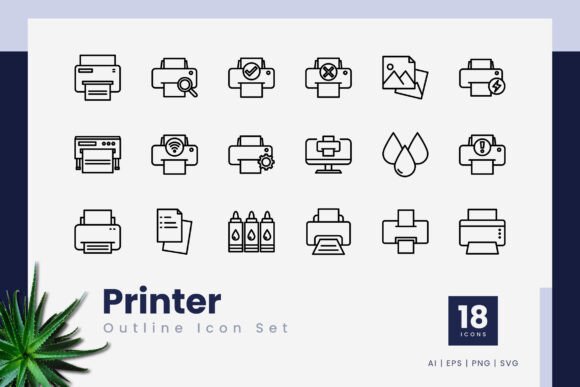
This set includes 18 individual icons, all built as editable vector outlines. The files come in formats you can actually use: AI, EPS, SVG, and PNG with transparency. There is even a readme file included so you do not have to guess how to open or organize the assets. Whether you use Adobe Illustrator, CorelDraw, Affinity Designer, or even free tools like Inkscape or Figma, these files are ready to drag and drop into your workspace.
Where These Icons Fit Into Real Projects
The real value of Printer Outline Icons is not in the number 18 or the file formats. It is in how easily they blend into everyday work. Think about the last time you put together a presentation for a client or a team meeting. You needed a visual cue for printing instructions, file submission guidelines, or a workflow step. A generic screenshot or a pixelated image from a search engine does not look professional. A clean, consistent outline icon does. It communicates the idea instantly without distracting from your content.
For marketers and bloggers, these icons work well on landing pages, service pages, or how-to articles. If you write about document management, office productivity, or print-on-demand services, you have probably struggled to find visuals that match your brand style. With this set, you have a unified look right out of the box. The icons share the same stroke weight, line style, and overall visual language. That consistency matters more than most people realize until they see two mismatched icons sitting side by side on a page.
Small business owners who handle their own branding will appreciate how little effort it takes to customize these icons. You can change the stroke color to match your brand palette, adjust the line thickness if you need a bolder look, or combine them with other vector elements in your marketing materials. The editable stroke line means you are not locked into someone else's design choices. You can make the icon thinner, thicker, or even convert it to a filled shape if that fits your style better.
Practical Scenarios Across Different Roles
Let me walk through a few realistic situations where this icon set actually solves a problem.
Freelancers and independent creators often juggle multiple client projects with different visual styles. One client might need a minimalist presentation template. Another might want a detailed infographic about their printing workflow. Instead of searching for a new printer icon every time you start a project, you keep this set in your asset library. You open the AI or SVG file, copy the icon you need, paste it into your current document, and adjust the color in seconds. Over the course of a year, that saves hours of hunting and fixing low-quality graphics.
Educators and trainers who create handouts, worksheets, or slide decks often need simple visuals that do not distract from the learning material. A printer outline icon works perfectly for indicating print-friendly pages, showing where to submit assignments, or labeling instructions in a classroom handout. Because the icons are vector based, they scale cleanly whether you are projecting them on a screen or printing them on paper. You do not have to worry about blurry edges or pixelation when you enlarge them.
App and web designers working on mobile interfaces or dashboards frequently need toolbar icons, action buttons, or status indicators. A printer icon is a standard element in countless apps for functions like printing receipts, generating reports, or saving documents. Having a dedicated set with multiple variations lets you pick the exact style that matches your interface. You can use one icon for the main print action and another for a secondary function like print preview or print settings. The PNG transparency files are also handy if you need a quick placeholder without opening a vector editor.
Publishers and content creators who produce newsletters, zines, or digital magazines often include a print-friendly version of their content. A small printer icon next to a download link gives readers a clear visual cue. It is subtle but effective. When you use the same icon consistently across issues, readers start to recognize it instantly. That kind of visual habit builds trust and makes your content easier to navigate.
What to Consider Before Using This Icon Set
No icon set is perfect for every situation, and being honest about that upfront helps you decide if this one fits your needs.
The set includes 18 icons, which is enough for most projects but not an exhaustive library. If you need dozens of variations with different angles, perspectives, or intricate details, you might need a larger set or a custom design. But for most practical purposes, 18 well-designed outline icons cover the major use cases: a standard printer, a printer with paper, a printer with a checkmark, a printer with a cloud, and similar common variations. You get the essentials without paying for hundreds of icons you will never use.
Another thing to think about is the visual style. These are outline icons with a clean, modern look. They work beautifully in minimalist designs, corporate materials, and user interfaces. But if your brand leans toward a highly detailed, illustrative, or hand-drawn aesthetic, these might feel too simple. That is not a flaw of the set. It is just a matter of matching the style to the context. The good news is that the vector format gives you room to modify the icons, so you can add your own creative touches if you want.
File compatibility is rarely an issue with AI, EPS, and SVG formats, but double-check that your software supports these file types before purchasing. Most modern design applications handle them without trouble, but older versions of some programs might need a quick update or a plugin. The PNG files provide a fallback option if you need a raster image right away without dealing with vector software.
How the Features Translate to Real Outcomes
Let me connect the listed features to actual benefits you will notice when using these icons.
100 vector format and high quality mean you can scale the icons up to billboard size or down to favicon size without losing clarity. If you have ever tried to enlarge a small PNG and watched it turn into a blurry mess, you know exactly why vector matters. For print projects, this is especially important. A brochure or flyer printed at 300 DPI will show every imperfection in a low-quality graphic. Vector icons stay crisp because they are math, not pixels.
Editable stroke line gives you control over the weight and style of the lines. You can make them thinner for a delicate, modern look or thicker for a bolder, more prominent appearance. This is useful when you need to match the stroke weight of other icons in your project. Nothing looks more amateur than a set of icons where each one has a slightly different line thickness. With editable strokes, you can unify the entire set in a few clicks.
Easy to edit and scale is not just a marketing phrase. It means you can open the file, select the icon, change the color, resize it, rotate it, or combine it with other elements without breaking the design. The icons are built with clean paths and anchors, so you will not run into weird distortions or broken curves when you make adjustments. This matters when you are working under a deadline and do not have time to troubleshoot graphic glitches.
Easy drag and drop is exactly what it sounds like. Open the folder, grab the file you need, and drop it into your document. No complicated import settings, no converting formats, no missing fonts. The SVGs in particular are straightforward to use in web projects. You can embed them directly into HTML or open them in a code editor to tweak the path data if you are comfortable with that level of customization.
Multiple file formats cover different workflows. AI and EPS are standard for print and professional design. SVG works for web and responsive interfaces. PNG with transparency is ready for quick use in presentations, documents, or social media graphics. The readme file explains the folder structure and file naming, which is a small touch but saves time when you are in a hurry.
Everyday Users and Unexpected Situations
Even if you do not work in design or marketing, there are moments when a good printer icon becomes unexpectedly useful. A hobbyist organizing a community event might create a simple flyer with printing instructions. A parent helping with a school fundraiser could use an icon to label a "print at home" ticket. A small business owner setting up a simple website might need an icon for a "print this page" button. These are not high-stakes professional projects, but they still deserve visuals that look clean and intentional.
When you have a reliable icon set on hand, you stop wasting time searching for graphics every time a small need comes up. You open your folder, grab the icon, and move on with the rest of your work. That is the quiet efficiency that makes a tool like Printer Outline Icons worth having.
If you are someone who values consistency, clean design, and time saved on tedious tasks, this set fits naturally into your workflow. It does not promise to transform your brand overnight or replace your entire design library. It simply gives you a solid, usable set of printer icons that work across the projects you already handle. And sometimes, that is exactly what you need.