Business Deck Keynote Template: A Practical Tool for Clean, Professional Presentations
Creating a presentation that communicates clearly without distraction is harder than it looks. Many templates overcomplicate the visual field with excessive animations, busy backgrounds, or mismatched typography. Others feel generic and fail to support the substance of the content. The Business Deck Keynote Template aims to strike a more balanced approach—offering a clean, contemporary design system that prioritizes readability, structure, and visual consistency. For professionals who need to present company profiles, project updates, or strategic plans, this template provides a practical foundation that can be adapted without requiring advanced design skills.
What the Business Deck Keynote Template Offers
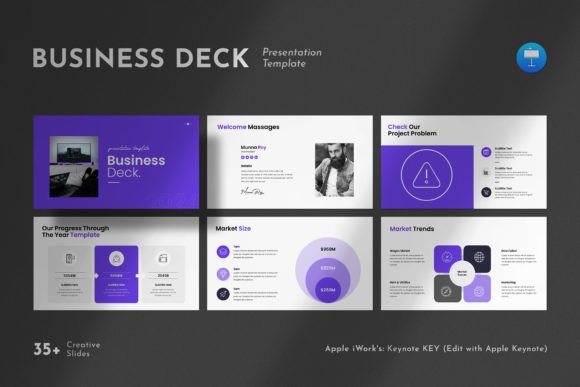
At its core, the Business Deck Keynote Template is a complete presentation framework built for Apple Keynote. It includes 36 slides that cover a wide range of common business presentation needs: title slides, content layouts, infographics, data tables, diagram pages, photo-focused spreads, and closing slides. The template works on both Apple and Windows systems, which is a practical advantage for teams working across different operating systems.
The design follows a 16:9 Full HD format at 1920x1080 pixels, which aligns with modern screen standards for projectors, monitors, and video conferencing platforms. The layout is based on Master Slides, meaning changes made to a master slide automatically update all slides using that layout. This approach saves time when adjusting colors, fonts, or positioning across the entire deck.
One of the more useful characteristics is the drag-and-drop photo replacement. Rather than wrestling with cropping tools or manual resizing, users can simply drop a new image into the designated placeholder, and the template adjusts automatically. This feature reduces friction when swapping out visuals, especially for those who iterate frequently on their decks.
Design Strengths and Visual Consistency
The Business Deck Keynote Template leans into restraint. The color schemes are understated, the typography is clean, and the spacing is generous. This is not a template that shouts for attention; it creates room for the content itself to take center stage. For professionals presenting data-heavy slides or detailed company information, this kind of quiet professionalism is often more effective than flashy design.
The inclusion of vector icons and infographic elements adds visual variety without introducing inconsistency. Icons are resizable and editable, so they can be recolored or scaled to match the deck's theme. The infographic layouts are structured enough to guide the user toward effective data visualization but flexible enough to accommodate different types of information—whether that's a timeline, a process flow, or a comparison chart.
Tables are often a weak point in presentation templates, either looking too sparse or too cluttered. The Business Deck Keynote Template handles tables with clear borders, alternating row colors, and readable font sizes. This makes it easier to present numerical data or comparative lists without losing clarity.
Usability and Editing Experience
A template is only as good as its editability. The Business Deck Keynote Template is built to be fully customizable. Every graphic element, text box, and shape can be resized, moved, recolored, or removed. Users are not locked into rigid layouts that break when something is adjusted. This level of control is valuable for teams that need to adhere to brand guidelines or for individuals who prefer to fine-tune every slide.
The free fonts used in the template are linked in the help file, which avoids licensing issues that sometimes arise with premium typefaces. For users who want to substitute their own fonts, the Master Slide structure makes that straightforward—change the font on the master, and it propagates across all slides.
One potential limitation worth noting is that the template is built specifically for Keynote. While it works on both Apple and Windows systems, users on Windows will need to have Keynote installed. The template does not include PowerPoint or Google Slides versions. If your workflow is tied to those platforms, you would need to consider whether the Keynote format fits your process or whether you are willing to export and adjust the file after purchase.
Real-World Performance in Business Settings
In practice, the Business Deck Keynote Template performs well in settings where clarity and professionalism matter most. For a company profile deck, the photo layouts allow you to showcase team members, office spaces, or product shots in a cohesive way. The infographic pages can summarize key metrics or milestones without overwhelming the audience.
For pitch decks or investor presentations, the clean design helps maintain focus on the narrative rather than the visual noise. The template does not rely on flashy transitions or heavy animations, which is a strength when presenting to serious stakeholders who want to evaluate content, not aesthetics.
Internal presentations—such as quarterly reviews, strategy updates, or team meetings—also benefit from the template's consistency. When every slide follows the same visual language, the audience can focus on the information without being distracted by layout changes. This is particularly important in longer decks where visual fatigue can set in.
The template also handles well for educational or training contexts. Educators and trainers who present to adult learners can use the clean slides to support their spoken content without competing for attention. The infographic and diagram layouts are especially useful for breaking down complex concepts into digestible visual steps.
Who Benefits Most from This Template
The Business Deck Keynote Template is a strong fit for professionals who present regularly and value efficiency. Entrepreneurs building a company deck from scratch can save hours of layout work and instead focus on refining their message. Marketers who need to create client-facing presentations can rely on the template's polished look without needing a design background.
Freelancers and small business owners often juggle multiple roles and may not have the time or budget to invest in custom presentation design. This template gives them a professional starting point that can be reused and adapted across different projects. The 36 slides provide enough variety to cover most business scenarios without feeling bloated or redundant.
Creators and bloggers who present at conferences, webinars, or workshops can also use the template to maintain a consistent brand presence. The drag-and-drop photo feature is particularly useful for those who update their visuals frequently or who work with a mix of original photography and stock images.
Educators and publishers who create training materials or informational decks will appreciate the clean typography and structured layouts. The template supports both text-heavy slides and visually driven spreads, making it adaptable to different content formats.
Considerations and Limitations
While the Business Deck Keynote Template covers a wide range of use cases, there are a few points to consider before purchasing. The images used in the demo are not included, so you will need to supply your own photos. For most users, this is not a problem—you likely have your own brand imagery or access to stock photo libraries. But if you were hoping for a set of included stock images, you should plan accordingly.
The template is designed for Keynote, which means users who prefer PowerPoint or Google Slides will need to convert the file. While Keynote can export to PowerPoint format, some elements may shift or require adjustment after conversion. If your team is strictly PowerPoint-based, you may want to test the compatibility first or invest in a template built specifically for that platform.
The design aesthetic is clean and contemporary, which suits a wide range of industries. However, if your brand or presentation style leans toward something more creative, bold, or unconventional, this template may feel too restrained. It is not a template that pushes design boundaries; it prioritizes clarity and professionalism over visual experimentation.
Long-Term Value and Support
A well-designed template can be used repeatedly across multiple presentations, making it a long-term investment rather than a one-time solution. The Business Deck Keynote Template's Master Slide structure and editable elements mean you can adapt it for different topics, audiences, and branding needs without starting from scratch each time. For professionals who present frequently, this repeatability is a significant time saver.
The support offered with the template adds to its reliability. The provider states that free real support is available from a skilled designer. This is worth noting because not all template purchases come with responsive assistance. If you encounter a formatting issue, need help with customization, or have a question about editing, having access to support can prevent frustration and downtime.
For those who value a clean, professional look and want to reduce the time spent on slide layout, the Business Deck Keynote Template offers a solid balance of quality, usability, and practical value. It is not a tool that promises to make your presentation brilliant on its own—no template can do that. But it provides a strong structural foundation that lets your content, data, and ideas speak clearly.
Whether you are preparing a company overview, a product launch, a training session, or a strategic report, this template can help you present with consistency and confidence. Its strength lies in its restraint: it gets out of the way and lets your work take center stage. For professionals who need a reliable, adaptable presentation framework, the Business Deck Keynote Template is worth considering.