Hoob Keynote Template: A Practical Evaluation for Professionals
When preparing a presentation, the template you choose can significantly influence how your content is received. A well-designed template does more than make slides look attractive—it helps structure information, guide attention, and communicate professionalism. The Hoob Keynote Template has gained attention among users of Apple's Keynote software for its clean, contemporary aesthetic and extensive feature set. This article provides a balanced, practical evaluation of the Hoob Keynote Template to help you determine whether it aligns with your presentation needs and professional goals.
What Is the Hoob Keynote Template?
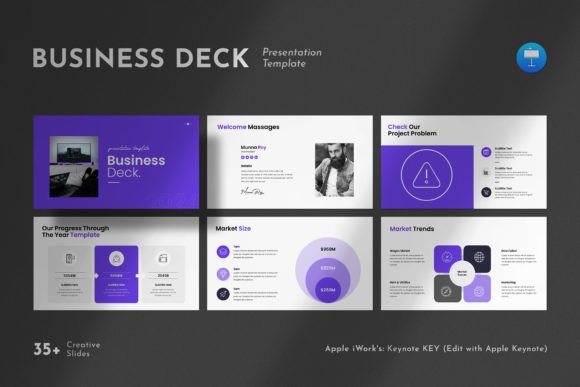
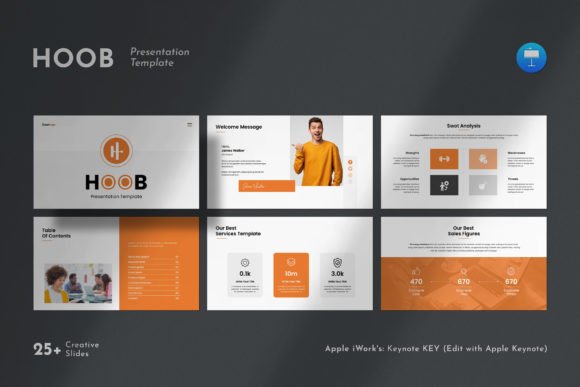
The Hoob Keynote Template is a presentation design package built specifically for Apple Keynote, though it also works on Windows systems. It includes 25 slides in total, organized around a simple yet powerful design philosophy that emphasizes clean layouts, professional typography, and visual elements such as photo layouts, infographics, tables, vector icons, and diagrams. The template is fully editable, meaning you can customize colors, fonts, images, and other graphic elements without needing advanced design skills. It uses a 16:9 Full HD ratio (1920x1080px), which aligns with modern display standards for projectors, monitors, and widescreen presentations.
The template operates on master slides, which allows for consistent formatting across your entire presentation. Changing a master slide automatically updates all slides based on that master, saving time and ensuring visual cohesion. The drag-and-drop functionality for images further simplifies the editing process, making it accessible for users who are not design professionals.
Key Features and What They Mean for You
To evaluate the Hoob Keynote Template effectively, it helps to understand what each feature actually offers in practice.
Master Slides and Consistency
Master slides are a core component of professional presentation software. In the Hoob Keynote Template, every slide is linked to a master, which means you can change the background, font style, or color scheme across all slides by editing just one slide. This is particularly useful for branding consistency, such as maintaining corporate colors and logos throughout a deck. For users who need to produce polished presentations quickly, this feature reduces repetitive formatting work.
Creative Photo Layouts and Infographics
The template includes various photo layout options that allow you to present images in visually engaging ways without designing from scratch. Infographics, tables, and diagrams are also built in, which can help you communicate data and processes more clearly. Instead of creating a chart or timeline manually, you can populate pre-designed graphic elements with your own information. This is beneficial for business reports, marketing pitches, or educational content where visual clarity is important.
Vector Icons and Resizable Graphics
Vector icons and graphics are resolution-independent, meaning they remain sharp whether displayed on a laptop screen or a large projector. All graphics in the Hoob Keynote Template are resizable and editable, giving you flexibility to adjust sizes, colors, and positions without losing quality. This is a practical advantage over templates that use raster images, which can become pixelated when scaled.
Free Fonts and Help File
The template uses free fonts, with links provided in the help file. This eliminates the need to purchase expensive typefaces, though you do need to download and install the fonts separately. The help file also contains additional guidance for editing and customization, which is useful for users who are unfamiliar with advanced Keynote features.
When the Hoob Keynote Template Shines
The Hoob Keynote Template is a strong fit in several common scenarios:
- Corporate presentations and company profiles. The clean, professional design supports branding and makes a positive impression on clients, investors, or stakeholders. The inclusion of infographics and tables is helpful for presenting company metrics, timelines, or strategic plans.
- Marketing and sales pitches. Creative photo layouts and vector icons help illustrate value propositions and product benefits without requiring a designer. The template's contemporary aesthetic aligns well with modern marketing communication standards.
- Portfolio or showcase presentations. If you are a photographer, designer, architect, or creative professional, the photo-centric layouts allow your work to take center stage while maintaining a polished frame around each piece.
- Educational or training materials. Diagrams and infographics facilitate learning by breaking down complex topics into visual segments. The template's structure helps educators maintain a logical flow throughout their content.
- Users who need quick turnaround. Because the template is fully editable and includes drag-and-drop image placement, you can assemble a complete presentation in a short amount of time, even if you have limited design experience.
When Alternatives May Be Worth Considering
While the Hoob Keynote Template offers many advantages, it is not the ideal choice for every situation. Understanding its limitations can help you avoid disappointment and choose a template that better fits your specific needs.
- When you need a very large number of slides. The template includes 25 slides, which is suitable for most standard presentations. However, if your project requires 40, 50, or more slides with distinct layouts, you may need to duplicate and modify existing slides, which can become repetitive. Some templates offer 50 or 100+ slides for more extensive decks.
- When you prioritize highly specialized design styles. The Hoob Keynote Template follows a contemporary, clean aesthetic. If your brand or industry requires a very specific look—such as ultra-modern minimalism, vintage, playful, or highly technical—you might find that the template's default style does not fully match your vision. While you can customize colors and fonts, the underlying layout structure is fixed, which can limit dramatic style changes.
- When you need extensive data visualization capabilities. Although the template includes infographics and diagrams, it does not offer advanced charting or dynamic data integration features that some specialized presentation tools provide. If your presentation relies heavily on real-time data, interactive dashboards, or complex statistical visualizations, you might need to supplement the template with additional software or custom-built graphics.
- When you work primarily in PowerPoint or Google Slides. The Hoob Keynote Template is designed for Apple Keynote and also works on Windows, but it is not natively built for other presentation platforms. If your team standardizes on PowerPoint or Google Slides, you may experience compatibility issues or need to convert files, which can sometimes alter formatting. In such cases, platform-native templates may offer more seamless integration.
- When you require team collaboration features. Keynote's collaboration capabilities are robust, but if your workflow relies heavily on real-time co-authoring with stakeholders who use different software, a cloud-based solution like Google Slides might be more practical. The template itself does not affect collaboration, but the platform choice can impact how smoothly your team works together.
Practical Considerations Before Downloading
Before deciding on the Hoob Keynote Template, consider the following factors that affect its real-world usefulness:
Software Compatibility
The template works on both Apple and Windows systems, but it is built in Keynote. If you are using Windows, ensure that you have Keynote for Windows installed or that you can open .key files through iCloud or other compatible software. Testing a sample slide before committing to the full template is a practical step to avoid unexpected issues.
Font Installation
The free fonts used in the template must be downloaded and installed separately. If you skip this step, your presentation may default to system fonts, which can disrupt the intended layout and visual balance. The help file provides links, but you should factor in the extra few minutes needed for installation.
Images Are Not Included
The demo images shown in the template's preview are not included in the download. You will need to supply your own photos and graphics. This is standard practice for template marketplaces, but it is worth noting so that you plan for image sourcing if you do not have a ready library of visuals.
Support Availability
The template comes with free real support from the designer. If you have questions about editing, customization, or technical issues, you can reach out for help. This is a valuable safety net, especially if you are not highly experienced with presentation software.
Making Your Decision: Is Hoob Keynote Template Right for You?
Choosing a presentation template ultimately depends on your specific goals, workflow, and audience expectations. The Hoob Keynote Template is well-suited for professionals who need a clean, modern, and flexible foundation for their presentations, particularly in business, marketing, and creative contexts. Its master slide system, vector graphics, and drag-and-drop functionality reduce the time and effort required to produce a polished deck.
If your presentation requires a very large number of slides, a highly specialized visual style, or native compatibility with PowerPoint or Google Slides, you may want to explore alternatives that better match those requirements. Similarly, if your work involves heavy data visualization or team collaboration across multiple platforms, consider how the template's platform fits into your existing tools.
A practical approach is to test the Hoob Keynote Template with a small project before committing to it for a major presentation. This allows you to evaluate the editing experience, the consistency of master slides, and the overall look and feel with your own content. By doing so, you can make an informed decision based on real-world use rather than on promotional descriptions alone.
Final Thoughts
The Hoob Keynote Template offers a balanced combination of professional design, editing flexibility, and practical features that serve a wide range of presentation needs. It is not a one-size-fits-all solution, but for many professionals, it provides a reliable and efficient way to create presentations that are visually coherent and audience-appropriate. By understanding both its strengths and its limitations, you can determine whether this template supports your objectives or whether a different approach would serve you better.