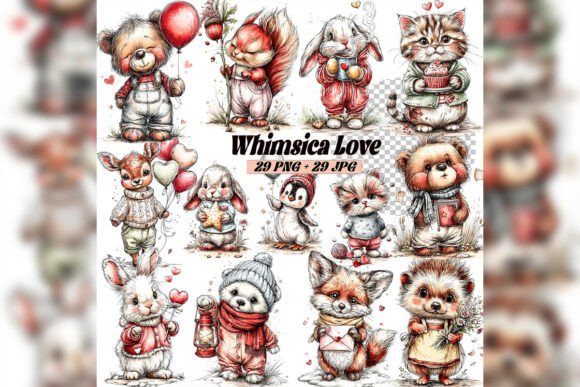
Whimsical Love Teddy Clipart Set: A Practical Guide for Creative Professionals
When you are building a cohesive visual brand or crafting seasonal projects, the assets you choose directly affect both your workflow efficiency and the emotional resonance of your final work. The Whimsical Love Teddy Clipart Set offers a collection of hand-painted watercolor illustrations that combine teddy bears, love-themed animals, hearts, flowers, and Valentine details in a soft, storybook-inspired style. This digital asset bundle is designed for creators who need high-quality, ready-to-use imagery without the time investment of commissioning custom illustrations or painting elements from scratch. Understanding how to integrate such a set into your existing processes can save hours of production time while maintaining a consistent, professional aesthetic.
Understanding the Asset and Its Place in Your Workflow
This clipart set contains both PNG files with transparent backgrounds and JPG files with white backgrounds, all at 300 DPI and 4096 x 4096 pixels. The resolution and transparency options are deliberate: they allow you to drop elements directly into design software without additional masking or cutting out. Whether you use Adobe Photoshop, Affinity Designer, Procreate, Canva, or even Microsoft PowerPoint, the files are immediately usable. The hand-painted watercolor style means each piece carries natural texture, soft color transitions, and slight organic imperfections that mimic physical painting. This is valuable for anyone who wants a handcrafted, romantic look without needing to master watercolor techniques themselves.
The collection fits best in the pre-production and assembly phases of a creative project. Instead of spending days sourcing individual images, testing compatibility, or creating original illustrations, you have a curated set of matching elements that already share a unified color palette, texture quality, and artistic voice. This reduces decision fatigue and keeps your visual language consistent from the start.
Preparing Your Workspace and Software for Smooth Integration
Before you open your design application, take a few minutes to organize the downloaded files. The set includes multiple PNG and JPG files. Create a dedicated folder on your local drive or cloud storage, and subdivide it by subject matter if the collection contains distinct categories such as teddy bears, small animals, hearts, floral accents, and full compositions. Name each file descriptively rather than relying on generic numbers. For example, rename a file to "watercolor-teddy-holding-heart.png" instead of "img_0423.png." This small organizational step pays dividends when you are working under a deadline and need to locate a specific bear or flower in seconds.
If you use a digital asset management (DAM) system, ingest the files there and tag them with keywords like "Valentine," "watercolor," "teddy," "love animals," and "whimsical." This makes the set searchable across multiple projects over time. For those using design platforms like Canva, upload the PNG files to your brand kit or asset library so they are available across all your designs without re-uploading.
Check your software's color profile settings before importing. Watercolor clipart typically looks best against white, cream, or soft pastel backgrounds, and the files are encoded in sRGB. If you are working in Adobe Photoshop or Illustrator, ensure that your document color settings match to avoid washed-out or oversaturated rendering. A quick test: drag one PNG into a new document and compare its appearance to the preview image from the product page.
Print Projects: Cards, Prints, and Stationery
For physical print products, the 300 DPI resolution at 4096 pixels gives you flexibility to output at sizes up to roughly 13 by 13 inches at full quality. You can scale down without losing sharpness. When designing Valentine's Day cards or greeting cards, use the transparent PNGs to layer bears and floral elements on textured paper backgrounds. Place a teddy bear as the focal point on the front cover, then add smaller heart or flower accents around the edges. Because all elements share a watercolor style, the composition feels like a single painted image rather than a collage of disparate parts.
For sublimation projects, the PNG format is especially useful. Sublimation printing requires clean edges and high contrast for vibrant transfer. The transparent background eliminates the need to manually remove white halos or background pixels. Import the bear directly into your sublimation design software, position it on a mockup (mug, t-shirt, pillow), and export with transparency intact. Test a single print with one element on a sample substrate before producing in bulk to confirm that the watercolor textures translate well onto your specific material.
Digital and Social Media Graphics
Social media content often needs to convey emotion quickly. The Whimsical Love Teddy Clipart Set gives you instantly recognizable symbols of affection and warmth. Use a single teddy bear as the hero image for a Valentine's Day promotional post, or build a flat-lay style graphic with multiple animals, hearts, and flowers arranged on a neutral background. Because the files are high resolution, you can crop into specific details, like the bear's face or a single heart, to create custom thumbnails or profile icons.
If you create content for engagement-driven platforms like Instagram or Pinterest, maintain visual consistency by using the same set across a campaign. A series of posts that all feature the same watercolor teddy bear, but in different arrangements or with different text overlays, builds a recognizable aesthetic. This reduces the time you spend searching for new imagery for each post and strengthens your brand's visual identity.
Nursery Wall Art and Children's Decor
For clients or personal projects involving nursery design, the soft watercolor style and cozy animal subjects are a natural fit. You can compose a single large print featuring a teddy bear surrounded by hearts and flowers, or create a triptych with three separate animal illustrations. The transparent PNGs allow you to layer elements over a painted or textured background, such as a soft sky blue or blush pink. Position the main subject slightly off-center and add smaller accents to balance the composition. When printing for framing, always export at 300 DPI and use a professional print service that handles watercolor-style artwork well to preserve the subtle color gradations.
Practical Quality Control and Consistency Checks
Before you deploy the clipart across multiple projects, run a quality control pass. Open each file in your design software and inspect for:
- Edge integrity: The transparent PNGs should have clean, anti-aliased edges without jagged pixels or visible clipping.
- Color uniformity: All elements should share a similar warmth and saturation level. If some images appear slightly cooler or warmer, you may need to apply a subtle color overlay or adjustment layer to unify them.
- Resolution behavior at scale: Scale a few elements up to 150% and down to 30% to see how the watercolor texture holds up. The hand-painted quality means some texture variation is normal and desirable, but you want to ensure no unintended blurriness appears at your intended output size.
- Background compatibility: Test the PNG files on a white background, a dark background, and a patterned background to confirm that transparency works correctly and no white fringing occurs.
If you plan to use these assets repeatedly over months or years, create a template file in your design software that already has the clipart loaded as linked or embedded elements. For example, set up a standard card template with a bear placeholder, a text area, and a decorative border. Then each time you need a new card, you simply swap out the accent elements and update the text. This template-based approach drastically reduces repetitive layout work.
Combining the Clipart with Other Resources and Tools
The Whimsical Love Teddy Clipart Set works well as a stand-alone collection, but its value increases when layered with complementary resources. Pair the watercolor animals with hand-lettered typography or script fonts that echo the organic feel of the paintings. If you use mockup templates for product presentations, drop the PNG elements directly into the mockup layers. Many mockup files (for mugs, apparel, prints) include smart objects that accept layered files; using transparent PNGs here preserves the watercolor texture without flattening.
For those who work in Canva, upload the PNG files to your uploaded assets and use the background remover tool if any residual white exists (though properly exported PNGs should not need this). In Procreate, import the bears as separate layers on a canvas and use blending modes like Multiply to integrate them with painted backgrounds. The compatibility across digital workflows means you are not locked into a single ecosystem.
If you collaborate with other designers or hand off files to clients, deliver the final compositions as layered PSD or AI files with the clipart elements on separate, labeled layers. This allows the recipient to adjust positions, remove elements, or resize without starting over. It also demonstrates professionalism and saves back-and-forth revision cycles.
Long-Term Asset Management and Reusability
A well-purchased clipart set should serve you for years, not just for one Valentine's Day cycle. Store the original download in a secure location, and create a separate "working copies" folder where you keep any modified versions (for example, if you recolored a bear to match a specific brand palette). Maintain a simple spreadsheet or note file that tracks which projects used which elements. This is especially useful if you run a small business and need to avoid using the same exact bear arrangement on two different clients' materials without realizing it.
Because the set is commercial-use friendly for personal and small business purposes, you can incorporate the illustrations into products for sale such as printed cards, digital downloads, stickers, and party decorations. Always review the specific license terms included with your purchase to confirm usage limits. Some licenses restrict the total number of copies sold or require attribution. Respecting those terms protects your business and respects the illustrator's work.
When the season passes, archive the assets with clear folder naming like "2025 Valentine Clipart - Whimsical Love Teddy." Next year, when you need romantic-themed imagery, you can pull the folder knowing exactly what you have. This eliminates the temptation to buy duplicate assets or waste time hunting for files buried in your downloads.
Practical Implementation Tips for Different Project Types
- Party decorations: Use the large JPG white-background files for quick printing of banners, cupcake toppers, or tent cards. The white background gives you a clean base that works well on colored paper without worrying about transparency.
- Planner and journal designs: Scale down the PNG bears and hearts to small icon sizes (1–2 inches) and use them as section dividers, mood trackers, or decorative stickers. The watercolor texture adds a tactile feel to digital planner spreads.
- Social media story highlights: Extract a single bear face or heart, resize it to 180 x 180 pixels, and use it as a custom highlight cover icon on Instagram. The soft style stands out against solid-colored backgrounds.
- Email marketing headers: Place a teddy bear or floral cluster in the top-left corner of your newsletter header to create immediate visual warmth. Keep the rest of the layout clean to let the illustration draw attention without clutter.
- Educational or blog content: Use the images as visual anchors for articles about relationships, self-care, or seasonal celebrations. The watercolor aesthetic feels approachable and non-commercial, which can increase reader engagement.
Each of these applications benefits from the same core preparation: organize, test, and template. The upfront investment of an hour spent organizing and testing the clipart set will save you many hours over the life of the collection.
Final Observations on Workflow Integration
The Whimsical Love Teddy Clipart Set is not a magic solution that designs projects for you, but it is a reliable, high-quality building block that fits cleanly into a structured creative process. Its value comes from the combination of resolution, format flexibility, and consistent artistic style. By treating the set as part of your standard asset library rather than a one-time purchase, you integrate it into your workflow in a way that reduces production time and maintains visual quality across projects. Whether you are a small business owner batch-producing Valentine's products, a designer building a cohesive brand campaign, or a hobbyist creating personal gifts, the structure you apply around using these assets determines how much time and effort they save you. Prepare properly, test before scaling, and reuse deliberately, and this clipart set becomes a dependable component of your creative toolkit.