Nitrogen Icons: A Complete Set of High-Quality Minimalist Icons for Every Project
When you are building a website, designing a mobile app, or putting together a printed brochure, the icons you choose can make or break the visual experience. Icons are not just decorative elements; they guide users, communicate ideas instantly, and reinforce your brand identity. Yet finding a single icon set that works across all your projects—from digital screens to print materials—can be surprisingly difficult. That is where Nitrogen Icons come in. This comprehensive collection offers a set of high-quality icons that are suitable for any project, with a clean, minimalist design that fits seamlessly into modern workflows.
What Are Nitrogen Icons?
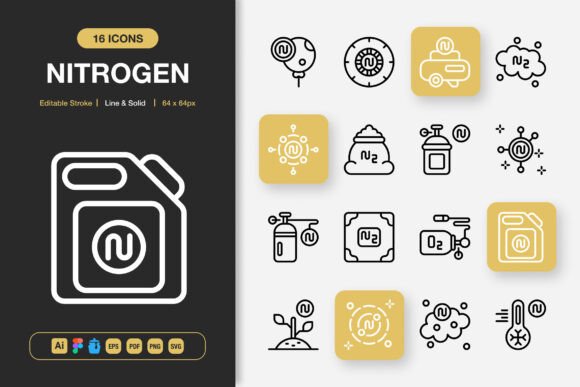
Nitrogen Icons is a thoughtfully curated icon library designed to meet the needs of designers, developers, content creators, and business owners alike. The set includes hundreds of meticulously crafted icons in both line and solid styles, giving you the flexibility to choose the look that best suits your project. Each icon is built on a consistent grid, ensuring visual harmony whether you are using them in a mobile app interface, a social media graphic, an infographic, a flyer, a banner, a poster, or a book layout.
The collection is delivered in multiple file formats—Adobe Illustrator, Figma, Iconjar, EPS, PDF, SVG, and PNG—so you can work in whatever environment you prefer. PNG exports are provided in seven sizes: 32px, 48px, 64px, 96px, 128px, 256px, and 512px. This range means you have the right resolution for everything from tiny UI elements to large-format prints. A readme.txt file is also included to help you get started quickly.
Why Finding the Right Icon Set Can Be Challenging
Many designers and project managers have experienced the frustration of sourcing icons that look good in one context but fall apart in another. Perhaps you have downloaded a free set only to discover that the stroke weights are inconsistent, the icons lack scalability, or the style doesn't match your brand. Perhaps you have spent hours editing icons to fit a color scheme or resizing them for different platforms, only to end up with pixelation or misalignment. For teams working across web, mobile, and print, maintaining a cohesive visual language can feel like an uphill battle.
Another common pain point is file compatibility. You might receive an icon set in a format your design tool cannot open, or you might need to export multiple sizes for different use cases. If the set does not include source files, customizing colors, strokes, or shapes becomes nearly impossible without starting from scratch. These obstacles slow down production, inflate costs, and dilute the quality of your final output.
How Nitrogen Icons Addresses These Situations
Nitrogen Icons was built to solve these exact problems. The set is fully customizable, which means you can adjust colors, stroke weights, and sizes without losing clarity or consistency. The editable stroke feature allows you to fine-tune line thickness to match your design guidelines, whether you prefer a delicate thin line or a bolder outline. Because the icons are vector-based, they scale indefinitely without pixelation—critical for responsive web design and high-resolution printing.
The inclusion of both line and solid styles gives you two distinct visual languages in one package. You can use the line style for clean, modern interfaces and the solid style for situations where you need stronger visual weight, such as app icons or call-to-action buttons. Having both styles available means you are not forced to mix icon sets from different sources, which often leads to inconsistency in stroke width, corner radius, and overall aesthetics.
Drag-and-drop functionality is another time-saver. The files are organized so that you can quickly insert an icon into your design software without complex importing steps. For teams using Figma, the dedicated Figma file allows for direct editing and collaboration. For Adobe Illustrator users, the source file gives you full control over every anchor point and curve. Iconjar users can browse and apply icons directly from their library, streamlining the design process even further.
Practical Applications and Real-World Outcomes
When you adopt Nitrogen Icons, you unlock a wide range of practical uses. For a web designer building a SaaS landing page, the icons can be used in navigation menus, feature sections, testimonials, and footer links. The minimalist style ensures that the icons support the content rather than distracting from it. For a mobile app developer, the multiple PNG sizes mean you can export icons for splash screens, tab bars, and notification badges without generating each size manually. The SVG files also integrate smoothly with modern front-end frameworks, keeping your code lightweight and scalable.
Print designers will appreciate the high-resolution PNG exports and the EPS and PDF files. Whether you are laying out a magazine spread, designing a poster for an event, or creating a product catalog, the icons remain crisp at any scale. The 512px PNG size, for example, is more than adequate for large-format prints, while the smaller sizes work perfectly for business cards or book margins.
Social media managers and content creators can use Nitrogen Icons to enhance posts, stories, and infographics. Icons can highlight key statistics, illustrate step-by-step guides, or add visual interest to quote graphics. Because the set is consistent in style, your social media presence will look cohesive across platforms, reinforcing brand recognition.
Infographic designers often struggle to find icons that fit a specific theme without clashing. With Nitrogen Icons, you have a broad library covering common categories such as technology, business, health, education, finance, communication, and more. You can mix and match icons within a single infographic without worrying about visual discord. The result is a polished, professional piece that communicates information clearly and effectively.
Recommendations for Getting the Most Out of Nitrogen Icons
To maximize the value of this icon set, start by reviewing the entire library to familiarize yourself with what is available. Create a mood board or a style guide that defines how you will use line versus solid styles across your projects. For digital interfaces, the line style often works best for primary navigation and content areas, while solid icons can serve as status indicators or action buttons. For print materials, consider using solid icons when you need high contrast, especially if the icons are printed at small sizes.
Customization is one of the strongest features of Nitrogen Icons. Do not hesitate to adjust the stroke weight to match your brand typography. If your brand uses bold headings, a thicker stroke on icons will create visual harmony. If your design is more airy and minimal, a thinner stroke may be more appropriate. The editable stroke makes this adjustment quick and easy.
Take advantage of the multiple file formats to build a streamlined workflow. If you work in a team, store the source files in a shared drive or cloud folder so that everyone accesses the same versions. Use the Iconjar file if your team relies on icon management tools, as it keeps the entire set organized and searchable. For developers, the SVG files are ideal for embedding directly into HTML or using with icon libraries like React Icons or Vue components.
When exporting PNGs for specific use cases, choose the size that best matches the destination. For favicons, 32px is sufficient. For social media thumbnails, 64px or 128px works well. For app store screenshots, 256px or 512px ensures clarity on retina displays. The readme.txt file includes basic instructions, but you can also create your own cheat sheet with size recommendations for each project type.
How Different Users May Approach Nitrogen Icons
A freelance graphic designer might use Nitrogen Icons as a go-to resource for client projects. Because the set is royalty-free and broadly usable, you can apply it to multiple clients without worrying about licensing restrictions. The ability to customize colors and strokes means you can adapt the icons to each client's brand guidelines quickly, saving hours of manual redrawing.
A startup founder building a minimum viable product (MVP) will appreciate the speed that Nitrogen Icons offers. Instead of designing icons from scratch or hunting for alternatives, you can drop pre-made, high-quality icons into your prototype and focus on core functionality. The drag-and-drop convenience and Figma file make iteration fast during the early stages of product development.
An educator or author creating a textbook or e-learning module will find the icons useful for illustrating concepts, labeling diagrams, and breaking up text-heavy pages. The clean, minimalist style helps learners focus on the content without visual clutter. The multiple export sizes ensure that icons remain legible in both print and digital formats.
A marketing team running a multi-channel campaign can use Nitrogen Icons to maintain visual consistency across email newsletters, landing pages, social media ads, and printed collateral. By using the same icon set everywhere, you reinforce brand cohesion and make your campaign look polished and professional. Team members can work in different design tools—some in Figma, others in Illustrator—and still produce aligned results because the files are available in multiple formats.
Useful Considerations Before You Start
Before diving into a large project, test the icons in your actual environment. Import a few icons into your design software and try resizing them, changing colors, and adjusting stroke weights. This will give you a feel for how they behave and whether any adjustments are needed. Because the icons are vector-based and well-constructed, you should find them easy to work with.
If you are collaborating with developers, provide them with the SVG files and a simple naming convention. This reduces back-and-forth and ensures that the icons displayed in the final product match your design mockups exactly. For web projects, consider using inline SVGs rather than icon fonts, as SVGs offer better control over styling and accessibility.
Keep the readme.txt file handy. It contains basic information about the set and may include tips for troubleshooting common issues. While the set is designed to be intuitive, a quick reference can save time if you encounter a question about file formats or structure.
Conclusion: A Reliable Foundation for Any Project
Nitrogen Icons delivers exactly what its name suggests: a clean, consistent, and comprehensive set of high-quality icons that are suitable for any project. Whether you are designing a mobile app, building a website, creating an infographic, producing a book, or assembling a marketing campaign, this collection provides the flexibility and quality you need. The combination of line and solid styles, editable strokes, multiple file formats, and a wide range of PNG sizes removes the typical friction points associated with icon sourcing. You can focus on your creative work instead of battling technical limitations.
By choosing Nitrogen Icons, you are investing in a visual asset that will serve you across countless projects and platforms. The minimalist design ensures timeless appeal, while the customization options let you make each icon your own. If you are looking for a practical, solution-focused icon set that supports your goals and streamlines your workflow, Nitrogen Icons is a solid choice. Explore the library, experiment with the styles, and see how much smoother your next project can be.