Juneteenth Icons: Minimalist Design for Modern Projects
Building a visual language that resonates with your audience requires more than good intentions—it demands precise, reusable assets. Juneteenth Icons delivers exactly that: a set of high-quality, minimalist icons designed to celebrate Juneteenth while fitting seamlessly into professional workflows. Whether you are a marketer preparing a campaign, a developer building a mobile app, or an educator assembling learning materials, these icons provide a consistent visual foundation that saves time and elevates your output.
What Juneteenth Icons Offers as a Design Resource
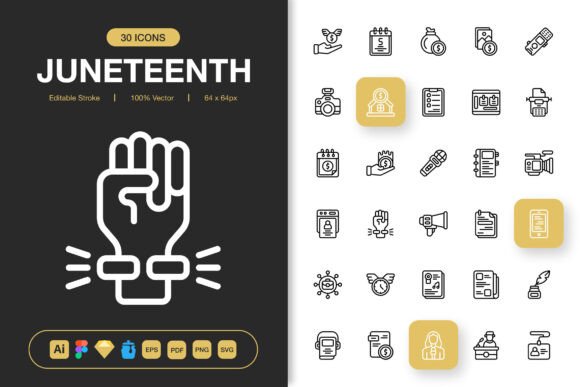
At its core, this collection is a curated library of symbols related to Juneteenth—freedom, unity, heritage, and celebration. But its value extends far beyond subject matter. Each icon is built with an editable stroke, meaning you can adjust thickness, color, and alignment without degrading quality. The set is 100% customizable, and every file has been prepared for drag-and-drop integration into popular design tools.
The package includes source files for Adobe Illustrator, Figma, Iconjar, and Sketch, plus EPS, PDF, SVG, and PNG versions at seven transparency sizes: 32px, 48px, 64px, 96px, 128px, 256px, and 512px. A Readme.txt file rounds out the delivery. This combination of formats and features makes the set suitable for websites, mobile apps, books, social media, infographics, flyers, print, banners, posters, and more.
Where Juneteenth Icons Fits in Your Workflow
Design resources are most useful when they slot into your existing process without friction. Juneteenth Icons is built for that kind of integration. You can bring it in at multiple stages of a project, depending on your role and needs.
Before a Project: Laying the Visual Groundwork
When you are planning a new campaign, product launch, or educational module, it helps to have a core set of symbols that define the visual tone. Using Juneteenth Icons early lets you establish a consistent style guide before creating custom assets. For example, you can place the icons into a mood board in Figma or Illustrator, adjust stroke weights to match your typography, and decide on a color palette that works with the black‑and‑white originals. This upfront investment reduces revision cycles later.
During a Project: Speeding Up Execution
Once a project is underway, speed matters. With Juneteenth Icons, you can drag and drop files directly from your asset panel into your design. Need a small icon for a button? Use the 32px PNG. Working on a poster header? Open the SVG in Illustrator, change the stroke color to your brand hue, and scale it to any size without pixelation. The editable stroke capability means you can fine‑tune weight for readability at small sizes or for bold impact at large ones—without redrawing the shape.
For developers, the SVG and PNG files embed directly into code or assets folders. Because the icons are minimalist, they load quickly and scale cleanly on retina displays. The multiple PNG sizes also help when you need fixed‑pixel assets for mobile app sprites or favicons.
After a Project: Maintaining Consistency Across Deliverables
After launch, you may need to produce additional materials—social media cards, follow‑up emails, print collateral, or internal presentations. Having the same icon set available in multiple formats ensures that every touchpoint shares a coherent visual language. You can create a sub‑folder of your icon library specific to Juneteenth campaigns and reuse the same files year after year, updating color or stroke thickness as your brand evolves.
Integration with Tools and Platforms
Juneteenth Icons is designed to work with the apps you already use. The file list includes:
- Adobe Illustrator (.ai) – Full editability: every anchor point and stroke is adjustable.
- Figma (.fig) – Direct import into components or frames; easy to prototype.
- Iconjar – Keeps your icon library organized with searchable metadata.
- Sketch – Perfect for macOS‑based design workflows.
- EPS and PDF – Fallbacks for legacy software or print‑ready output.
- SVG – For web development, inline use, or responsive design.
- PNG (7 sizes) – Ready‑to‑drop into any document or codebase.
Because the files are vector‑based where it matters, you can transform them between formats using Illustrator or free tools like Inkscape without losing fidelity. For teams that use a shared design system, the Figma and Sketch files can be imported as components, then synced via cloud libraries.
Organizing Your Icon Library
The moment you open the package, create a dedicated folder called “Juneteenth Icons” and treat it as your master copy. Inside, keep sub‑folders for each format (AI, Figma, SVG, PNG, etc.). If you work in a team, upload the Figma file or Iconjar set to a shared drive so everyone uses the same strokes and styles. This avoids the common problem of mismatched icon weights across different designers.
Scaling and Stroke Adjustment
Because the strokes are editable, you can make global changes in minutes. In Illustrator, select all icons and adjust the stroke panel to a uniform thickness. If your app uses 2px strokes on a 24px grid, set that as your base. For print, you might want 1.5pt. Test a few sizes early—the Readme.txt includes scale recommendations, but real‑world testing on your canvas will confirm what works.
Color and Brand Alignment
Juneteenth Icons ships as black outlines. For a unified brand look, create a color variant. In Figma, use instance swapping: duplicate the icon component, override the stroke color, and save it as a variant. For web, wrap the SVG in a container and apply CSS stroke or fill properties. This keeps the shapes responsive while locking in your palette.
Using the PNG Sizes Strategically
The seven PNG sizes cover everything from toolbar icons (32px) to hero graphics (512px). For mobile apps, use the 48px or 64px versions for tap targets. For social media thumbnails, 128px often hits the sweet spot. Naming convention matters: rename each file with its size (e.g., “icon‑freedom‑128.png”) so you can grab the right one without opening the folder.
Quality Control and Long‑Term Use
High‑quality icons maintain their value over years of reuse. The Juneteenth Icons collection meets that standard through vector precision and consistent geometry. Before using any icon, inspect it at 200% zoom in your design tool to verify stroke joins and endpoint caps. Because the set is editable, you can fix any minor alignment issues yourself—but the supplied files are clean enough to use as‑is in most projects.
For long‑term maintenance, plan to revisit the icon set once per design refresh. If your brand updates its stroke weight or adds a secondary color, open the master .ai file, apply the change globally, and re‑export the needed formats. The package’s flexibility makes updates a ten‑minute task rather than a full redesign.
Efficiency Gains Across Roles
Different team members benefit from Juneteenth Icons in distinct ways:
- Designers – Save hours by not drawing common symbols from scratch. Drag‑and‑drop from Iconjar or Figma plugins.
- Marketers – Create campaign graphics quickly using PNGs in Canva or Photoshop. Stroke consistency helps maintain brand polish.
- Developers – Use SVGs inline or sprite sheets. The multiple PNG sizes eliminate manual resizing for responsive breakpoints.
- Educators – Embed icons into worksheets or slides. The minimalist style works well for black‑and‑white printing.
- Small business owners – Produce banners, flyers, and social posts without hiring a designer. The file variety covers print and digital.
Final Observations on Integration
Juneteenth Icons is not a one‑time download; it is a building block for your visual ecosystem. The combination of editable strokes, multiple file formats, and drag‑and‑drop simplicity means it can enter your workflow at any stage and stay relevant through multiple project cycles. The key to getting the most out of it is organization: set up your library early, standardize stroke weights, and use the format that matches your output medium.
By treating the set as a component of your broader design system—rather than a loose collection of images—you ensure consistency, reduce friction, and free up creative energy for the work that truly needs your attention. Whether you are a solo creator or part of a larger team, these icons offer a practical path to better visual communication, project after project.
We hope you find them as useful as we enjoyed putting them together. Thanks for choosing Juneteenth Icons.