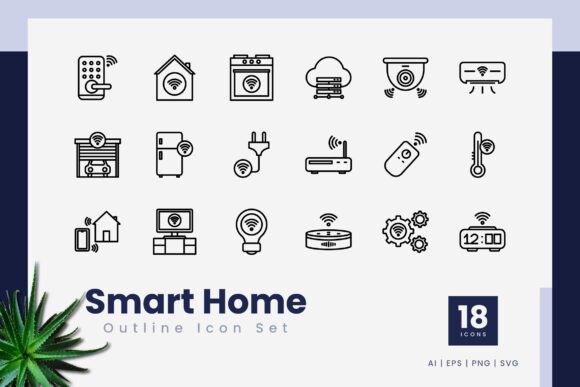
Smart Home Outline Icons for Clean Modern Design
Good design often comes down to the small details. A single icon can make an interface feel intuitive or cluttered. If you have ever built a mobile app, designed a presentation, or created content for a website, you know the struggle of finding visuals that are both professional and easy to work with. Smart Home Outline Icons offer a practical solution for anyone who needs clean, scalable symbols for smart home concepts without the overhead of complex graphics.
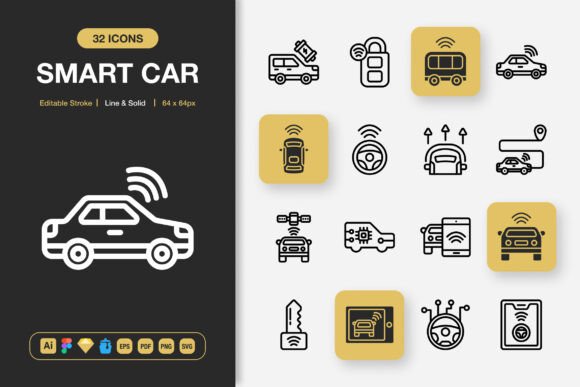
This is not just another generic icon pack. It is a focused collection of 18 outline icons built specifically around smart home themes. Each icon uses a consistent editable stroke line style, which gives your projects a unified look from the start. Whether you are a freelancer putting together a client pitch or a small business owner updating your website, having a reliable set of visuals saves time and keeps your design consistent.
What Are Smart Home Outline Icons Exactly?
Smart Home Outline Icons are vector graphics designed to represent common smart home ideas and devices. Think of elements like connected lights, thermostats, security cameras, sensors, smart speakers, and automation symbols. The set lives inside standard file formats such as .ai, .eps, .svg, and .png with transparency, meaning you can open them in Adobe Illustrator, CorelDraw, or even in browser-based tools.
Because they are vector based, these icons scale to any size without losing quality. A small icon on a mobile screen looks just as crisp as a large one on a printed poster. The editable stroke line feature means you can adjust the thickness, color, or curvature to match your brand or project style. You do not need to be a professional designer to benefit from this flexibility. The icons come ready to use, and the included readme.txt file offers basic guidance for getting started.
What makes this set stand out is its focus on simplicity. Outline icons, sometimes called line icons, strip away unnecessary detail. They communicate an idea quickly without overwhelming the viewer. For smart home content, this clean approach helps users focus on the function or feature you are highlighting, not on decorative extras.
Why Outline Style Works Well for Smart Home Themes
Smart home technology is about convenience, efficiency, and subtle integration into daily life. Outline icons mirror those values. They feel modern, uncluttered, and purposeful. A solid filled icon might feel heavy or dated, while a well-crafted outline icon suggests openness and clarity. This aligns naturally with how people experience smart home products: as tools that simplify tasks rather than complicate them.
The editable stroke line also gives you room to adapt. If your brand uses a specific color palette or prefers thinner lines, you can modify each icon without starting from scratch. This is especially valuable for entrepreneurs and bloggers who handle their own design work and need assets that bend to their vision, not the other way around.
Who Benefits from a Set Like This
You might wonder if a collection of 18 icons is enough for your project. The answer depends on what you are building. For many common use cases, a focused set like this covers the essentials without forcing you to sort through hundreds of irrelevant symbols. Here is a look at who tends to get the most value from Smart Home Outline Icons.
- Mobile app developers need lightweight vector assets that look sharp on different screen sizes and resolutions. These icons integrate easily into iOS, Android, or cross-platform projects.
- Web designers and UX professionals can use the SVG files directly in website code or import them into design tools like Figma or Sketch. The consistent stroke style helps maintain visual harmony across pages.
- Marketers and content creators often produce blog posts, infographics, or social media graphics that explain smart home features. Icons make complex ideas more accessible and break up text-heavy layouts.
- Educators and trainers who teach smart home concepts can incorporate these visuals into slides or handouts. A simple icon of a smart lock or thermostat is easier to recognize than a paragraph of text.
- Freelancers and small business owners juggle multiple roles and need ready-to-use assets that look polished without a big time investment. The included file formats work across common software, so you are not locked into one tool.
- Hobbyists and DIY creators exploring smart home automation can use the icons in personal dashboards, home automation interfaces, or even printed labels for physical devices.
Practical Ways to Use Smart Home Outline Icons
Understanding the file types is one thing, but seeing how they apply in real situations makes the value clearer. Here are several realistic scenarios where this icon set shines.
Building a Website or Landing Page
If you run a blog about home automation or sell smart home products online, your website needs to communicate features quickly. Placing an outline icon next to each product category or benefit helps visitors scan and understand at a glance. For instance, a lightbulb icon next to smart lighting and a camera icon next to security makes navigation intuitive. Because the icons are SVG, they load fast and remain sharp on retina displays.
Creating a Mobile App Interface
Mobile app design demands simplicity. Screen space is limited, and every element must earn its place. Outline icons work well for navigation tabs, settings menus, and feature highlights. The 18 icons in this set cover core smart home areas, so you can build a clean interface without mixing different icon styles. The PNG transparency files also help if you are prototyping quickly and need drag-and-drop simplicity.
Designing Presentations and Infographics
Whether you are pitching a smart home concept to investors or explaining energy savings to a class, visual aids matter. A slide full of text loses attention fast. Replacing bullet points with icons makes your message stick. You can scale these vectors to poster size for printed infographics or shrink them for handout sheets. The .ai and .eps files give you full control over placement and styling in Adobe Illustrator or CorelDraw.
Print and Illustration Projects
Print requires high resolution, and vectors deliver exactly that. Use the icons on brochures, flyers, product packaging, or even stickers. Because the stroke lines are editable, you can adjust thickness to suit different print mediums. A thicker stroke might work better for a bold flyer, while a thinner line suits a refined product manual. The mockup preview is not included, but the icons themselves are production ready.
Infographics and Educational Content
Explaining how a smart home ecosystem works often involves showing connections between devices. Icons representing each device type help viewers follow the logic. You can arrange the icons in flowcharts, network diagrams, or step by step guides. The consistent visual language of Smart Home Outline Icons ensures the final piece looks cohesive rather than cobbled together from different sources.
Things to Consider Before Using This Icon Set
No single resource works perfectly for every project. Being aware of the strengths and limitations of Smart Home Outline Icons helps you decide if this set fits your specific need.
- Number of icons: With 18 icons, this is a curated set rather than an exhaustive library. If your project covers a very narrow niche or requires many specialized symbols, you might need supplemental icons from other sources. However, for most smart home related work, these 18 cover the fundamentals well.
- File compatibility: The set includes .ai, .eps, .svg, and .png formats. If your primary tool does not support these, you may need to convert files. Most modern design applications handle SVG and PNG easily, but it is worth confirming your software works with these types before purchasing.
- Editable stroke line: This is a major advantage for customization, but you do need basic familiarity with vector editing software to take full advantage. Beginners can still use the icons as they are, but adjusting stroke thickness requires opening the file in Illustrator, CorelDraw, or a similar application.
- Mockup preview not included: The product listing notes that mockup previews are not part of the package. What you receive are the icon files themselves, ready to be placed into your own designs. This is standard for icon sets, but it is good to know upfront so you set your expectations accordingly.
- Style consistency: Because all icons share the same outline style, they work well together. If you plan to mix them with icons from other sets, check that the visual weight and line thickness complement each other. The editable stroke makes it easier to harmonize mismatched elements.
Getting Started with Your First Icon
If you are new to working with vector icons, the process is simpler than it might seem. After downloading the files, unzip the folder and look for the readme.txt for a quick orientation. Open the .ai or .eps file in your vector software. You will see all 18 icons arranged on the artboard. Select any icon, and you can change its color, resize it, or adjust the stroke width using the stroke panel. Export your customized icon as PNG or SVG for use in your project.
For those who prefer a faster workflow, the PNG files with transparency are ready to drag and drop directly into websites, presentations, or documents. No editing required. The SVG files work well for web developers who want to embed icons inline with HTML and style them with CSS. This flexibility means you can start using the icons within minutes, regardless of your technical background.
Smart Home Outline Icons bring together practicality, quality, and ease of use in a modest but capable collection. Whether you are designing a mobile app, building a brand presentation, or creating educational materials about connected living, these icons give you a solid visual foundation. The vector format, editable strokes, and multiple file types ensure that both beginners and experienced creators can adapt them to their own workflows. And because the set stays focused on smart home themes, it avoids the noise of unrelated graphics, letting you communicate your message with clarity and confidence.